
Chrome extension
You ask. It does it, in your Chrome.
A personal agent next to the page: it compares prices, finds flights, builds your shopping list and even handles government websites. You follow every step and stop it whenever you want.
Free to install · Chrome on a computer (Windows, Mac and Linux) · uses the credits in your CodeMago account

How to start
- 1
Install
Click "Add to Chrome" on the Chrome Web Store and pin the CodeMago icon to the toolbar.
- 2
Sign in
Open the panel from the icon and sign in with your CodeMago account. A new account starts with 20 free credits.
- 3
Ask
Write what you need, your way. It tells you what it is about to do before each step.
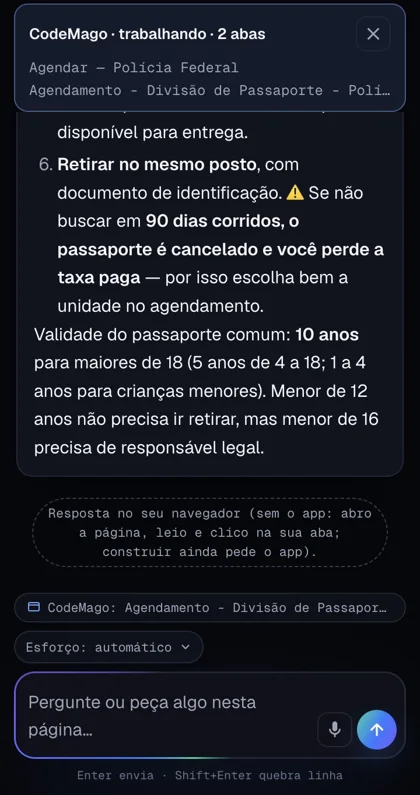
Real cases, recorded in the extension (in Portuguese)



What it does
Works in your tab
Opens the site, reads the page, clicks, types, scrolls and takes screenshots — in the Chrome you already use, with your logins.
Says it before doing it
Every step shows up in the panel before it happens, with a ✓ when it worked and the reason when it did not.
You see it, you stop it
The tab it works in gets a blue border and a "CodeMago is using this tab" notice with a Stop button.
Asks per site
The first time on each site it asks for permission. You can see and remove allowed sites anytime.
Step-by-step plan
A big request becomes a plan with checked steps, and it goes to the end without asking you to confirm at every turn.
Learns your way
Reads the skills in your account before acting and remembers the path that worked on each site.
Questions about the extension
Is the extension free?
Installing is free. Each request uses credits from your CodeMago account. A new account starts with 20 free credits, and on the free plan the balance is topped up to 10 every day.
Do I need an account?
Yes. Your CodeMago account pays for the AI that does the thinking. Without an account and credits the panel opens but cannot run requests.
Do I need the desktop app?
No. The extension works on its own in your tab. If the CodeMago app is open on your computer, it also talks to it.
Does it work on my phone?
No. Chrome extensions only exist on computers: Windows, Mac or Linux.
Does it touch my accounts?
Only on the sites you allow, and you see every step on screen. It carries the request through on its own, so ask only for what you want done — and hit Stop if you change your mind.
Can I stop it midway?
Yes. The Stop button in the panel or on the page notice stops it right away.